For most Irish SMEs with 10 to 100 staff, Bitwarden is the best password manager in 2026. It can keep your vault data in an EU region, connects to Microsoft Entra ID, and costs less per user than the other major business options.
1Password is the stronger pick when getting staff to use it every day is your biggest worry. Keeper suits firms in finance, legal or healthcare that want the tightest admin controls and a strong compliance story.
This guide compares all three on what an Irish business owner should care about. That means where your data lives, how leavers lose access, and what happens when someone forgets their master password. It also covers why browser-saved passwords and a shared spreadsheet aren't enough for a business.
Which Password Manager Is Best for Irish Businesses in 2026?
The best password manager for an Irish business depends on team size, budget and how much control you need. For a typical 10 to 50 person firm on Microsoft 365, Bitwarden Enterprise gives the best balance of EU hosting, single sign-on and price.
Here's how the main options line up:
- Bitwarden, best overall for most SMEs. Open source, an EU cloud region, directory sync on every business plan, and the lowest per-user cost of the three.
- 1Password Business, best for staff adoption. The most polished apps, Entra ID integration and an EU data region, at a higher price.
- Keeper, best for tight admin control. An EU data centre option, a European entity based in Ireland, and a government-validated encryption module.
- Browser-saved passwords, best avoided for business logins. No central admin, no audit trail and no clean way to remove a leaver.
What Makes a Business Password Manager Right for an Irish SME?
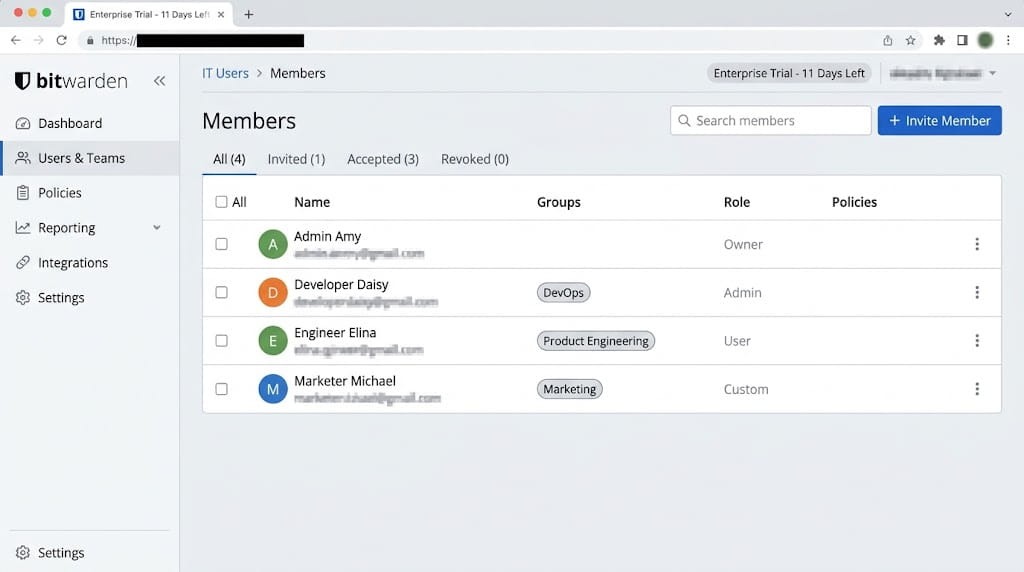
A business password manager earns its place when it protects shared logins, gives you control as staff join and leave, and keeps data where your GDPR obligations expect it. Autofill and password generation are standard now. The real differences sit in the admin console.
Ireland's National Cyber Security Centre recommends password managers in its online safety and password guidance because they generate strong passwords and leave staff with one password to remember. Before you sign up, check these six things:
- EU data region. Pick a provider that can host your encrypted vault in the EU, and choose that region at sign-up. Bitwarden won't move an existing account between regions without a full migration.
- Microsoft Entra ID sign-in and provisioning. Single sign-on (SSO) and SCIM let you add and remove users from the same directory that runs your Microsoft 365.
- Admin account recovery. If someone forgets their master password, an administrator should be able to restore access without the provider ever seeing the vault.
- Shared vaults with permissions. Your accounts team needs the banking logins. Everyone else doesn't.
- Audit logs. You want a record of who viewed or changed a shared credential, and when.
- Zero-knowledge encryption and passkey support. The provider can't read your data, and staff can store passkeys as more sites adopt them.
Bitwarden Review: Best Password Manager for Most Irish SMEs
Bitwarden is the strongest all-round choice for Irish SMEs because it pairs EU hosting with the lowest cost of the major business tools. Its code is open source, so independent researchers can inspect it, and it holds ISO 27001 and SOC 2 Type II certifications.
The plan you choose matters more with Bitwarden than with most tools:
- Teams plan. Covers secure sharing, event logs, directory sync and SCIM provisioning. It suits small offices that need shared vaults and a tidy way to add users.
- Enterprise plan. Adds SSO with Entra ID, organisation-wide policies, custom roles and admin account recovery. Any firm that wants to enforce rules across staff will need this tier.
- Self-hosting. Enterprise customers can run Bitwarden on their own servers for full data control, though someone has to maintain that server.
The trade-off is polish. The interface is functional rather than slick, so plan a short training session for less confident staff.
1Password Business Review: Best for Getting Staff to Use It Daily
1Password Business is the best pick when staff adoption is your main risk. A vault nobody uses protects nothing, and 1Password's apps consistently rate among the easiest to use in independent reviews.
For an Irish firm, three details stand out:
- EU data region. 1Password offers EU hosting, which is set when the account is created.
- Entra ID integration. Business plans connect to Microsoft Entra ID (formerly Azure AD) for sign-in and user provisioning.
- Closed source and a higher price. You're relying on published security audits rather than open code, and it costs noticeably more per user than Bitwarden.
It makes most sense for agencies, recruiters and sales teams, where people log into dozens of web tools a day and friction kills adoption fast.
Keeper Review: Best for Firms That Need Tighter Admin Control
Keeper suits regulated firms such as accountants, solicitors and financial advisors that want granular control and a strong compliance record. Business customers can choose an EU data centre, and Keeper's cloud hosting includes regions in Ireland and Germany.
Its encryption module holds FIPS 140-3 validation, a US government standard that auditors and insurers recognise. Keeper also runs a European entity, Keeper Security EMEA Limited, based in Ireland.
The catch is complexity. The admin console has a lot of settings, and higher tiers are priced on quote. Get a full quote for the setup you need before you commit.
Why Browser Password Managers Fall Short for Irish Businesses

Browser password managers in Chrome, Edge or Safari work for personal use, but they weren't built for business. There's no central admin view, no controlled sharing and no reliable way to cut a leaver off from company logins saved in their own browser profile.
Microsoft's own changes show how much has shifted. Its support note on the Authenticator autofill change confirms that Authenticator stopped storing and autofilling passwords in 2025, with saved passwords moved to Edge instead. Plenty of Microsoft 365 users still assume Authenticator holds their logins.
The other common office setups carry the same problems:
- A shared spreadsheet. Anyone who opens it sees every password, and a copy sits in every inbox it was ever emailed to.
- Sticky notes and notebooks. Easy to photograph and easy to lose.
- One shared login for a whole team. No record of who did what, and a password nobody wants to change.
Is LastPass Still Safe for Irish Businesses?
LastPass still operates and its vault encryption held up during the 2022 breach, but the incident has left many businesses wary. In December 2025, the UK Information Commissioner's Office fined LastPass £1.2 million over the breach, which affected up to 1.6 million UK users.
The attackers got in through compromised employee laptops and then reached backups of customer data. Vault contents stayed protected by each user's master password. However, details such as names, email addresses and stored website URLs were exposed.
If your business is on LastPass now, take two steps today:
- Make sure every user has a long, unique master password and MFA switched on.
- Decide whether moving to one of the three tools above is worth the migration effort at your next renewal.
How Password Managers Support GDPR and NIS2 Readiness in Ireland
A business password manager won't make you compliant on its own, but it's one of the clearest security measures you can document. GDPR requires appropriate security for personal data, and stolen or reused passwords remain a leading way that data gets exposed.
The audit logs, access controls and MFA policies in a business plan give you evidence to point to if a client, insurer or regulator asks how you protect logins. That matters more as cyber insurance questionnaires get more detailed.
NIS2 raises the bar again for firms in scope. Ireland hasn't finished putting it into law, and our guide to NIS2 compliance for Irish SMEs covers who's affected and what to prepare. Access control and authentication sit squarely within the risk-management measures the directive expects.
How to Roll Out a Password Manager Across Your Business

Rolling out a business password manager doesn't need to be a big project, but the order you do it in decides whether staff stick with it. The steps are choose, pilot, connect, migrate, enforce and review.
- Choose your EU region and plan first. Region choice is hard to change later, so settle it before anyone creates an account.
- Pilot with two or three people. Include your least technical staff member. If they manage, everyone can.
- Connect it to Microsoft Entra ID. Use SSO and SCIM where your plan allows, so new starters get access automatically and leavers lose it once their Microsoft 365 account is disabled.
- Move shared logins into permission-based vaults. Start with banking, payroll, domain and social media accounts, then delete the spreadsheet.
- Turn on MFA for the vault and set policies. Require a strong master passphrase and a second factor for every user.
- Run a password health check. Use the built-in reports to find weak or reused passwords, then change them over the following weeks.
If you'd rather not run this in-house, a provider offering managed network security can take on the setup, directory integration and offboarding checks for you as part of ongoing support.
Choosing the Best Password Manager for Your Irish Business
Bitwarden Enterprise is the sensible default for most Irish SMEs. 1Password fits teams that need the easiest experience, and Keeper fits firms that want the tightest control. Whichever you choose, the real gains come from connecting it to Entra ID and retiring the shared spreadsheet for good.
If you'd like a second opinion on how your business stores and shares logins today, book a free IT audit with our team and we'll show you where the gaps are before you commit to anything.
Get an IT Plan Today!